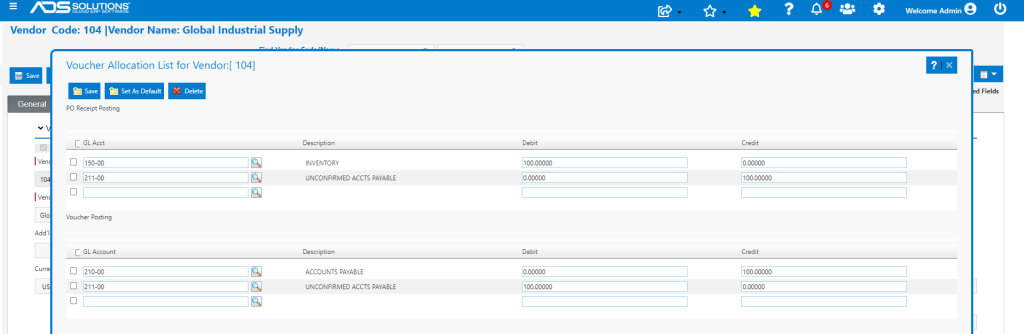
Accolent ERP allows for creating default GL Posting allocations for Vendors. For GL Posting purposes there are two types of vendors: Inventory Vendors and Non-Inventory Vendors, and each of these are posted to the General Ledger differently. Inventory Vendor transactions are posted through the PO Receipts Accounting Journal while Non-Inventory Vendor transactions are posted through the AP Accounting Journal. Whenever a Vendor Invoice (referred to as a “Voucher”) gets created for that Vendor, the entered allocations will default into the GL Posting.
Type of Vendor
- Go to Purchasing/Vendors > List Vendors, select a Vendor then designate on the General tab whether this is an Inventory Vendor or not.
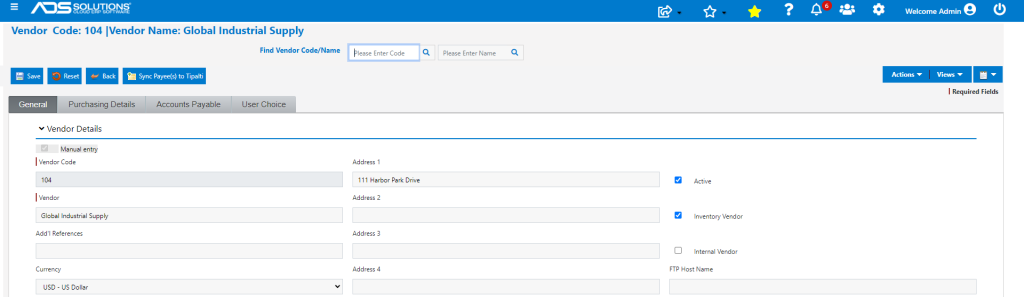
Setting Voucher Allocations
- Select the Vendor then go to Actions > Voucher Allocations, then enter the desired default GL Allocations.
- Note that multiple GL Accounts may be selected and a percentage allocation entered for each so long as all such allocations total 100%.
- These allocation percentages will default in when entering a Voucher, but may be overwritten.
- Once the Voucher is saved, the GL Account allocations will determine how the Voucher is posted to the GL.
Non-Inventory Vendor
- Non-Inventory Vendors are those from which goods or services are purchased for consumption rather than for resale.
- For non-Inventory Vendors there is only one GL Posting through the AP Journal.
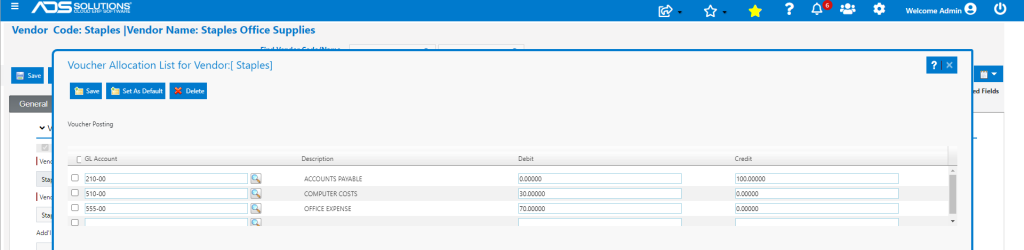
- The typical posting will be to debit one or more Expense accounts or Asset Accounts and credit Accounts Payable.
- Go to Actions > Voucher Allocations and enter Voucher Allocations desired.
Inventory Vendor
- Inventory Vendors are those from which goods are purchased for purposes of resale.
- For Inventory Vendors there are two GL Postings: (1) upon PO Receipt through the PO Receipt/Inventory Adjustment Journal and (2) upon entry of the Vendor Invoice or Voucher through the AP Journal.
- Upon PO Receipt, the typical posting is to Debit Inventory and Credit Unconfirmed Accounts Payable.
- Upon entry of the Voucher the typical posting is to debit Unconfirmed Accounts Payable and credit Accounts Payable.
- Go to Actions > Voucher Allocations and enter the voucher allocations desired.