
Accolent ERP uses Vouchers to create Accounts Payable entries for vendor invoices. Typically, the Vouchers will be dated as of the date created; however, it is possible to back-date Vouchers if desired.
Create Backdated Voucher
- Go to Payables > List Vouchers > Add Voucher.
- Use system generated Voucher No ZZ11550.
- Voucher Date will default to today’s date (e.g., 11/13/2024).
- In this case, though use a backdated date (e.g., 10/25/2024).
- Because this is a non-inventory vendor, the Override PO and Receipt checkbox is automatically checked.
- Enter Receipt Amount Paid of $420.00.
- Then Save.
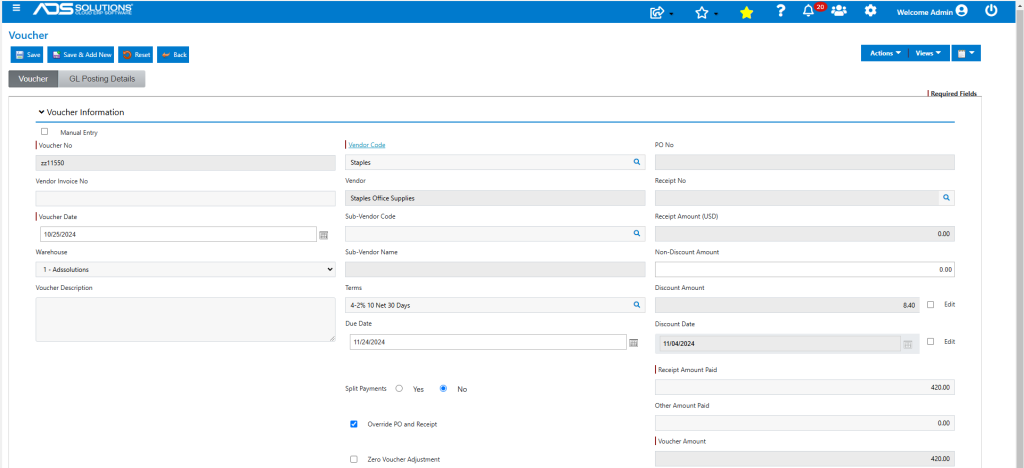
- The Voucher will be created with the backdated Voucher Date entered 10/25/2024.
- The Due Date will be derived based on the Voucher Date and Terms.
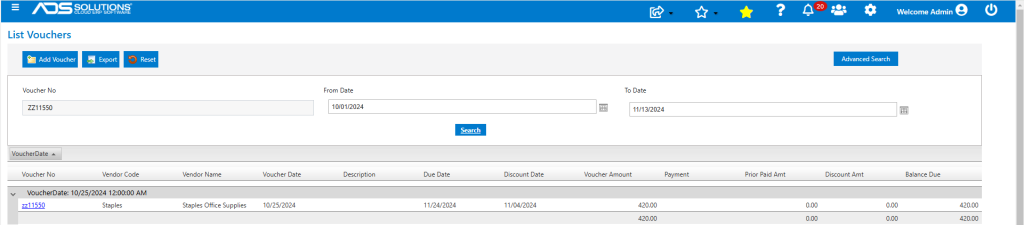
- Look up List Vouchers – Voucher ZZ11550 created with Voucher Date of 10/25/24.
General Ledger Effect
- To backdate any transaction, the GL Fiscal Period that the transaction will be backdated into must not be Closed.
- Look up GL > Manage General Ledger > Evaluate Transactions.
- Select the backdated date range and the Accounts Payable Journal.
- GL Posting of ZZ11550 made as of 10/25/2024.

- The system will automatically update the balances for the month to which the transaction was backdated and all subsequent months.