
Accolent ERP allows for the use of manual checks or computer checks. Manual checks can be used to pay existing Vouchers. First create Vouchers or select existing Vouchers to be paid, then create the Manual Check. Any available early payment discounts based on the date of the Manual Check, the date of the Vouchers being paid and the Terms on the Vendor will automatically show up when a Voucher is selected to be paid. Users can override the Terms to extend the discount date and take a discount even if expired.
Create Manual Check
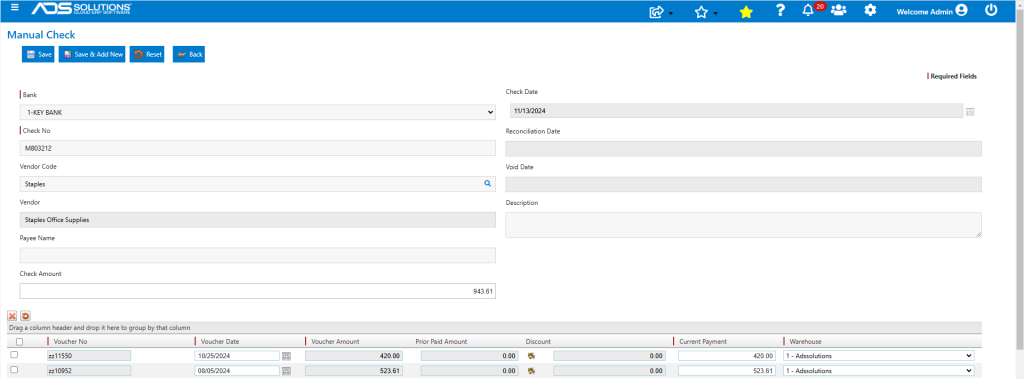
- Create Manual Check M803212.
- Enter Vendor and check date.
- Select Vouchers ZZ11550 and ZZ10952 to pay on this check.
- Based on the Vendor’s Terms and the Voucher dates, the discount has expired on both Vouchers.
Extending Discounts
- Click on the Discount icon to extend or modify the Discount taken on any Voucher.
- For example, Voucher ZZ11550 has a Discount Date of 11/4/2024.
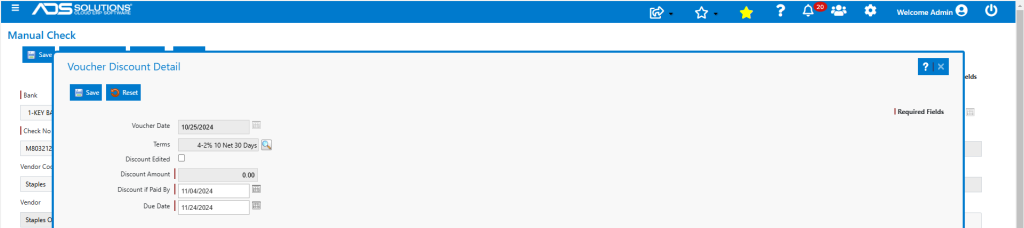
- Modify the Discount Date to 11/13/2024 to take the discount of $8.40 and Save.
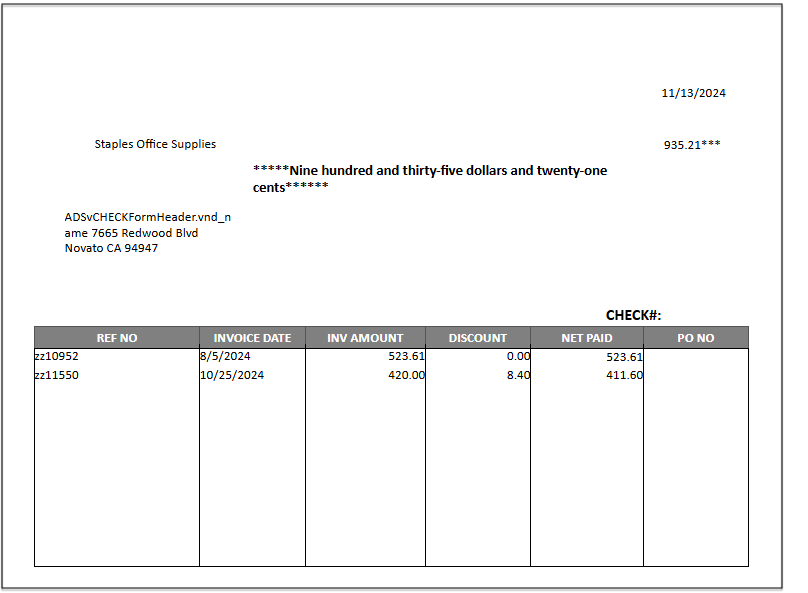
- Enter a payment amount of $935.21 on the Manual Check.
- Then Save to create the Manual Check M803212.

- This is the printed the check.
General Ledger Effect
- Go to General Ledger > Manage General Ledger > Evaluate Transactions.
- Look up check date (11/13/2024) and select Cash Disbursements Journal.
- This is the GL Posting of the manual check.
