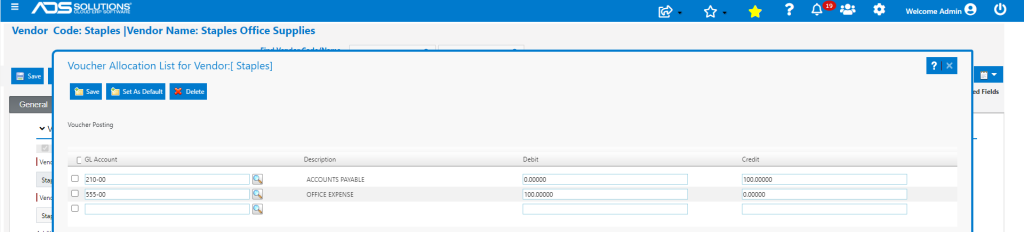
Accolent ERP allows entry of GL Posting Allocations for a Vendor that will automatically default the GL Accounts and allocations into a voucher created for the Vendor. For GL Posting purposes there are two types of vendors: Inventory Vendors and Non-Inventory Vendors, and each of these are posted to the General Ledger differently. Inventory Vendor transactions are posted through the PO Receipts Accounting Journal while Non-Inventory Vendor transactions are posted through the AP Accounting Journal.
Type of Vendor
- Go to Purchasing/Vendors > List Vendors, select a Vendor then designate on the General tab whether this is an Inventory Vendor or not.
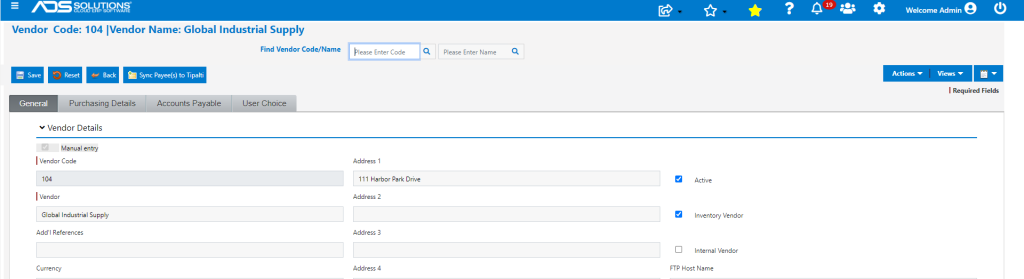
Inventory Vendor
- An Inventory Vendor is an entity from which goods are purchased for purposes of resale
- Transactions with an Inventory Vendor include the following process steps: (1) Issuance of a Purchase Order (PO), (2) Receiving the PO, (3) Put-away and updating of Inventory and (4) Creation of a Voucher to pay the Vendor’s Invoice(s)
- Purchases from an Inventory Vendor are made by first issuing a PO to the Vendor
- A PO is a legally binding document between Purchaser and Vendor
- The PO details the items the Purchaser agrees to purchase at the designated price
- The PO also outlines the delivery date and terms of payment
- Upon receipt of the goods from the Vendor, the PO is then Received
- The Receiving process involves inspecting incoming goods delivered and matching received items to the accompanying bill of lading, and the PO
- Discrepancies are recorded and tracked and goods put-away
- Inventory is updated to reflect receipt of the goods into stock
- There are often multiple PO Receipts against a single PO
- When the Vendor’s invoice is received, the invoice is tied out against the PO Receipts and a voucher created and then paid
- There may be multiple Vendor Invoices
Inventory Vendor GL Postings
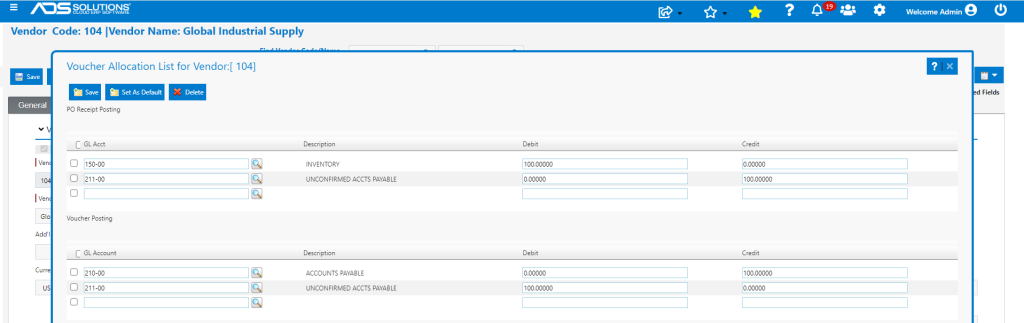
- There are two GL Postings made for a transaction with an Inventory Vendor
- The first GL Posting occurs upon Receipt of the PO
- The second GL Posting occurs upon recording of the Vendor Invoice for payment
- The GL Accounts for these two GL Postings are set up from the Vendor > Actions > GL Posting Allocations
- The typical GL Postings for an Inventory Vendor upon PO Receipt are to:
- Debit Inventory, and
- Credit Unconfirmed Accounts Payable
- The Unconfirmed Accounts Payable account is a holding account that a PO Receipt is booked to pending tie-out against the PO and receipt of the vendor’s invoice – this must be set up on the Warehouse GL Account Defaults
- The typical GL Postings for an Inventory Vendor upon recording of the Vendor Invoice for Payment are to:
- Debit Unconfirmed Accounts Payable, and
- Credit Accounts Payable
- To make these GL Posting settings, go to the Vendor > Actions > GL Posting Allocations
- Then enter the appropriate GL Allocations
- Either the debit or credit side or both sides of these GL Postings may be split between multiple accounts as desired
Non-Inventory Vendor
- A Non-Inventory Vendor is an entity from which goods and services are purchased for consumption
- Transactions with a Non-Inventory involve receipt of the goods or services
- When the Vendor’s invoice is received, a voucher is created and then paid
Non-Inventory Vendor GL Postings
- There is only one GL Posting made for a transaction with a Non-Inventory Vendor
- The GL Accounts for these two GL Postings are set up from the Vendor > Actions > GL Posting Allocations
- The typical GL Posting for a Non-Inventory Vendor is:
- Debit Expense, and
- Credit Accounts Payable
- Either the debit or credit side or both sides of this GL Posting may be split between multiple accounts as desired