
Accolent ERP posts transactions to the General Ledger (GL) through the following Accounting Journals: Sales Journal (SJ), Payment Receipts Journal (PR), PO Receipts/Manual Inventory Adjustments Journal (PO), Accounts Payable Journal (AP), Voucher Adjustments Journal (VA), Cash Disbursements Journal (CD) and the General Journal (GJ). The Accounting Journals are automatically posted to the GL immediately upon completion of the underlying transaction.
Cash Disbursements Journal
The CD Journal records the creation of Checks (whether computer checks or manual checks) to pay Vouchers or Customer Refunds. The typical GL posting of Check is to debit the Accounts Payable record that was created through the Voucher or Customer Refund, and credit Cash in Bank. Any early payment discounts provided reduce the credit to Cash in Bank and credit a Cash Discounts Taken account. Included below are the GL Postings for some common Cash Disbursement Journal transactions.
Create a Check to Pay a Voucher with No Discount
- Create voucher ZZ10487 for $500.00 for vendor with no discount terms.
- Then create and issue check M80653 to pay the voucher.
- This is the GL Posting of the check: Debit to Accounts Payable and Credit to Cash in Bank.

Create a Check to Pay Multiple Vouchers and Adjustments
- Select vouchers ZZ10496, ZZ10500, and ZZ10501 totaling $420.00 with voucher adjustment A974 of $40.00.
- Create check M80654 for $380.00 to pay all 3 vouchers net of adjustment.
- This is the GL Posting of the check: Debit to Accounts Payable and Credit to Cash in Bank.

Create a Check to Pay Multiple Vouchers with Discounts
- Select vouchers ZZ10215 and ZZ10218 totaling $410.00 with discounts totaling $8.20.
- Create check M80655 for $401.80 to pay both vouchers net of discounts.
- This is the GL Posting of the check: Debit to Accounts Payable and Credit to Cash in Bank and Credit to Cash Discounts Taken.

Create a Check for a Partial Payment of a Voucher
- Select voucher ZZ10503 for $1050.00 that has a discount of $21.00.
- Create check M80656 for $500.00 to partially pay voucher prior to discount date.
- This is the GL Posting of the check: Debit to Accounts Payable and Credit to Cash in Bank.
- Note that there are no discounts allowed on partial payments.

Void Checks
- Void manual check M80656.
- Check was voided successfully as VM80656.
- Shows up under Check Type=Void Check, and the voucher is reopened.
- This is the GL Posting of the check: Debit to Cash in Bank and Credit to Accounts Payable, which reverses the original check posting.

Customer Refund Check
- Create credit memo CMI66409.
- Go to Payables > Create Checks > Create Customer Refund to refund the credit memo.
- Select Debit Account and Credit Account to reverse payment (NB: CM has already reversed sales posting)
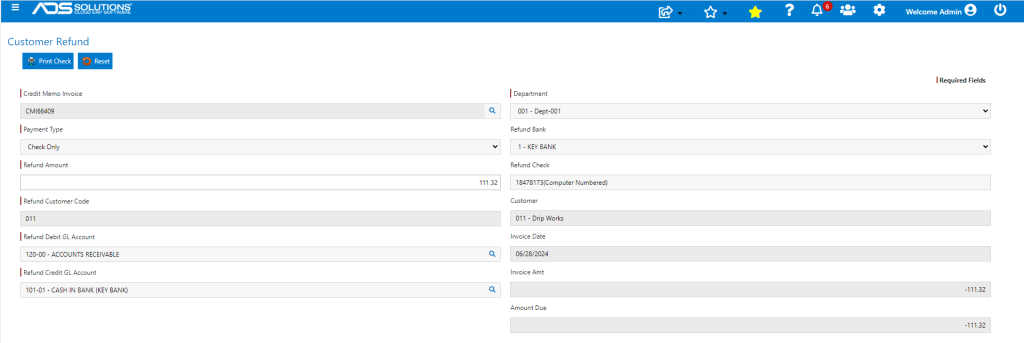
- The CM already reversed the sales posting, so the refund check reverses the payment of the invoice.
- This is the GL Posting of the refund check: Debit to Accounts Receivable and Credit to Cash in Bank.
