Accolent ERP posts transactions to the General Ledger (GL) through the following Accounting Journals: Sales Journal (SJ), Payment Receipts Journal (PR), PO Receipts/Manual Inventory Adjustments Journal (PO), Accounts Payable Journal (AP), Voucher Adjustments Journal (VA), Cash Disbursements Journal (CD) and the General Journal (GJ). The Accounting Journals are automatically posted to the GL immediately upon completion of the underlying transaction.
Accounts Payable Journal
The AP Journal records the creation of vouchers to pay Inventory and non-Inventory Vendors. For Inventory Vendors, the GL posting debits the Unconfirmed AP account and credits AP. For a non-Inventory Vendor, the debit is to an expense account and the credit to AP. Default voucher allocations are set up on the vendor and defaulted into the voucher but may be overwritten. Included below are the GL Postings for some common Accounts Payable Journal transactions.
Create a Voucher for a Non-Inventory Vendor
- Create voucher ZZ10503 for $1050.00.
- The vendor’s terms provide for an early payment discount of $21.00. The discount will not be posted to the GL until the voucher is actually paid.
- This is the GL Posting of the voucher: Debit to selected Expense account(s) and Credit to Accounts Payable.

Create a Voucher for an Inventory Vendor
- Create Voucher ZZ10505 to pay an Inventory Vendor.
- Look up and select Receipts 9537 and 9539 on POs C9218 and C9219 for $977.50
- This is the GL Posting of the voucher: Debit to Unconfirmed AP and Credit to Accounts Payable.

Create a Voucher for an Inventory Vendor with Landed Costs
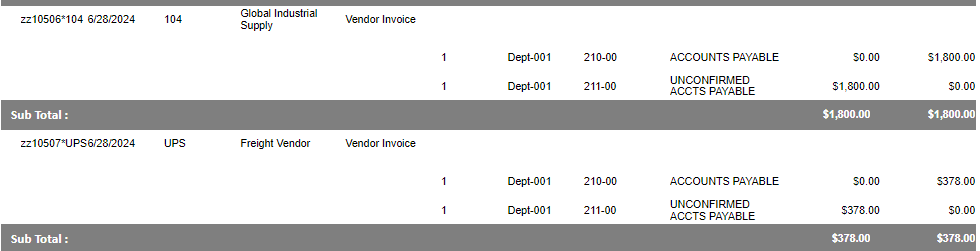
- Receive PO C9210 for $1800.00 and incur Freight of $378.00 as a Landed Cost.
- Create Voucher ZZ10506 to pay the Inventory vendor and ZZ10507 to pay the Landed Cost vendor.
- This is the GL Posting of both vouchers: Debit to Unconfirmed AP and Credit to Accounts Payable.