
Accolent ERP posts transactions to the General Ledger (GL) through the following Accounting Journals: Sales Journal (SJ), Payment Receipts Journal (PR), PO Receipts/Manual Inventory Adjustments Journal (PO), Accounts Payable Journal (AP), Voucher Adjustments Journal (VA), Cash Disbursements Journal (CD) and the General Journal (GJ). The Accounting Journals are automatically posted to the GL immediately upon completion of the underlying transaction.
Payment Receipts Journal
The Payment Receipts Journal records all transactions related to the receipt of payments from customers. When deposits are made on an order, the deposits are recorded as undeposited cash linked to that order and stay with the order through its movement to an Invoice. When payments are received on an invoice the payments adjust the AR record and the cash received is recorded as undeposited cash. When a Bank deposit is made, the cash is moved from undeposited cash to cash in bank. The undeposited cash GL Account is set up on the Warehouse GL Defaults, whereas the cash in bank GL Accounts are set up on the Banks Value List. Included below are the GL Postings for some common Payment Receipts Journal transactions.
Take a Deposit on an Order
- Open order 66917 for $97.41.
- Go to Actions > Take Payment for $97.41 to prepay the order – creates receipt 20081.
- The payment receipt is linked to order 66917.
- Since no AR record has yet been created for the order, the Payment Receipts Journal GL Posting debits Undeposited Cash and credits Customer Deposits, a liability account.

- When order 66917 is invoiced, the Sales Journal posts the sales entry and creates an AR posting.
- When the payment is applied, the Payment Receipts Journal debits Customer Deposits and credits AR.

Take Payment on an Immediate Invoice
- Take payment on Immediate Invoice I66975 for $111.32.
- Take payment in full for $111.32 on payment receipt 20082.
- Since payment is taken directly from the invoice, no write-offs can be taken.
- The Immediate Invoice creates the AR entry, then Payment Receipts Journal debits Undeposited Cash and credits AR.

Take Payment on an Invoice with a Write-Off
- Take payment on Invoice 66336 for $949.42.
- Assume payment is made for $949.40 and $0.02 is written-off to Uncategorized Expense.
- Payment will be taken from the Receivables > Payment Receipts menu, so write-offs may be taken in connection with closing an invoice.
- Note: no write-offs can be taken in connection with leaving an Amount Due balance on an Invoice.
- Payment receipt 20084 is created and Payment Receipt Journal debits Undeposited Cash and Uncategorized Expenses and credits AR.

Take Payment on an Invoice with a Discount
- Take payment on Invoice 66976 for $148.43.
- Payment terms provide for a 2.00% discount of $2.97.
- Payment will be taken from the Receivables > Payment Receipts menu, so discounts may be taken in connection with closing an invoice.
- Note: no discounts can be taken in connection with partial payment of an Invoice.
- Payment receipt 20086 is created and Payment Receipt Journal debits Undeposited Cash and Sales Discounts and credits AR.

Void a Payment
- Void payment 20081 for $97.41; do not add a service charge.
- Created payment receipt 20087 for -$97.41, and Payment Receipt Journal reverses original GL Posting.

Make a Bank Deposit
- Select 20080, 20082, 20084 and 20086 to deposit to the bank.
- Created Deposit D3713 for Bank 1 for $1,477.42.
- Payment Receipt Journal debits Cash in Bank and credits Undeposited Cash.

Record a Bounced Check
- Select payment 20082 for $111.32 that was deposited as D3713*1 and then bounced.
- Go to General Ledger > Manage Bank Accounts > Bank Deposits > Create Returned Check to record bounced check.
- Include Bank service charge of $20 and select GL Account to post service charge to.
- Payment Receipt Journal does the following transactions (1) reverses the deposit of $111.32 back to Undeposited Cash (2) reverses the payment to re-open the AR and (3) reduces Cash in Bank by the amount of the service charge and (temporarily) debits this to the Bank Charges account.
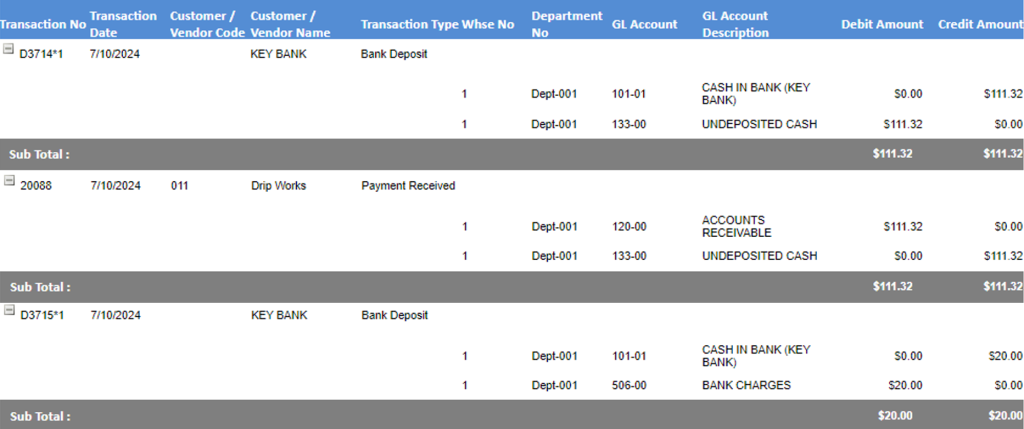
- The Sales Journal will separately make a Manual Invoice to pass the amount of the Service Charge to the Customer’s AR Account and reverse the expense posting to Bank Charges.
